To find unfinished puzzles in Order of the Sinking Star, inspect the overhead view for flashing portals. Small puzzle portals turn white when completed, but larger portals connected to colored obstacles can keep their corresponding color. Use the flashing indication and the identity of the room together; portal color alone is not a universal completion test.
The game has more than one thousand interconnected puzzles, so a single remembered route will not cover everything you can revisit. A small personal record can complement the visible cues, especially when you leave a difficult room and try another world. Keep “solved,” “unfinished,” and “not yet reached” separate. They describe different states and lead to different next actions.
Read the Overhead View for Unfinished Puzzles
Begin with a region you already recognize and open the overhead view. Watch the puzzle entrances long enough to notice flashing instead of making a decision from one static frame. The useful cue is a change over time, which can be easy to miss if you glance at the map and immediately close it.
An unfinished portal is a candidate to investigate, not a guarantee that you can reach it from your current position. First find its location, then inspect the surrounding route. The interconnected world can expose destinations that are visually nearby but require a different approach. Completion tracking tells you what deserves another look; navigation still determines how you get there.
Do not expect a single screenshot to demonstrate flashing reliably. A still image can identify the portal's location, but you need to watch its behavior in the game to see the change. Once you have identified the unfinished entrance, note its position relative to a landmark that stays easy to recognize at a closer view.
Use White Small Portals as a Completion Cue
Small portals provide a useful color change: they become white after completion. When surveying a cluster of these entrances, that lets you separate rooms you have solved from rooms that need inspection without stepping onto every entrance first.
The word “small” matters. Do not extend that rule to every large, colored entrance on the map. Larger portals associated with colored obstacles can retain the corresponding color. An entrance that remains colored is therefore not sufficient evidence that the puzzle behind it is unsolved.
Use this comparison as a quick reference:
| What you notice | How to use it | What it does not establish |
|---|---|---|
| A small portal that has turned white | Treat it as a completion cue for that small portal | The completion state of every nearby room |
| A portal flashing in the overhead view | Inspect it as an unfinished puzzle destination | That the route to it is currently straightforward |
| A large portal retaining an obstacle's color | Check other cues and inspect the entrance | That color by itself means unfinished |
| An entrance you cannot confidently identify | Compare its layout and landmarks | That it is the same puzzle as a similar-looking room |
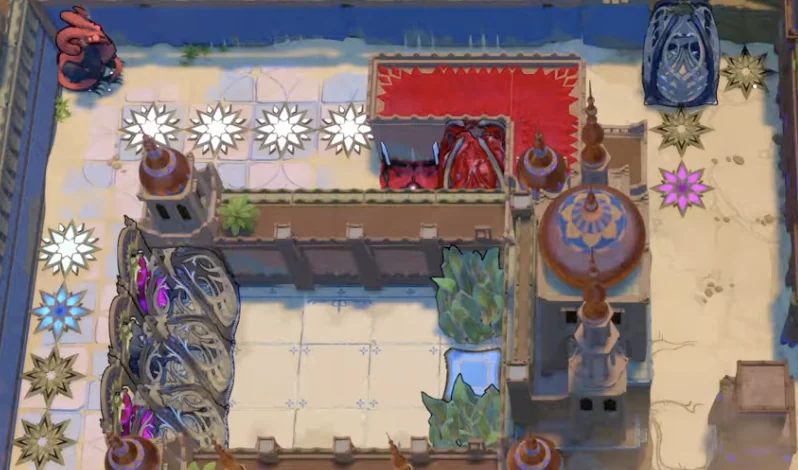
Small white entrances indicate solved puzzles; nearby cyan and dark entrances show other access states.
When you encounter an apparent conflict, such as a familiar completed room behind a colored entrance, stop applying the small-portal rule. Check the entrance's size and surrounding obstacle instead. A rule that works for one entrance type becomes misleading if you turn it into a universal legend.
Confirm the Room Before Marking It Solved
A tracker is only useful if each row refers to one recognizable puzzle. “Mirror Isles room” is too vague when an area contains many mirror challenges. Use an area name together with a visual landmark and a short layout description.
For example, “broken bridge, two green crystals” is more useful than “green puzzle.” “Large gap, four crystals” points to a different layout. You can identify the challenge without writing down the solution, so the record remains useful when you want to preserve the discovery for another attempt.
An attempted room should remain unfinished until you actually complete it. Recognizing the intended trick, reaching a promising arrangement, or seeing the exit is not the same as recording a completed challenge. If you stop after a partial attempt, make a note of the last useful idea so you can resume the reasoning without overstating your progress.
Keep a Personal Record That Supports Your Next Session
Use a notebook or a simple list if the visible map is enough for most of your play. A separate record does not need a percentage, database, or full catalog of every room. The most useful entries are the puzzles you intend to revisit and the places you need help distinguishing.
Suggested fields are:
- Area name as displayed in the game.
- Entrance landmark or screenshot label.
- A brief description of the room's distinctive layout.
- Status: solved, unfinished, or not yet reached.
- The next action you intend to try.
These are personal note fields, not claimed built-in tracker features. They keep the record compact while preserving enough detail to act. A note such as “try shifting the mirror before moving the second crystal” is actionable; “hard puzzle” tells you little when you return a week later.
Separate Unfinished from Unreachable
Completion tracking and access tracking answer different questions. An unfinished puzzle is one you have not solved. An unreached puzzle is one you have not yet entered or cannot currently approach by the route you are using. A room can belong to both categories, but those categories should not be collapsed into one vague “missing” label.
This distinction helps you choose your next task. If you reached a room and left after trying several ideas, return when you want to work on that mechanic. If you spotted an entrance but could not reach it, your task is to understand the surrounding route. Replaying the nearest solved room repeatedly may not resolve the access problem.
Record why you left. “Could not reach entrance from this island” directs attention to navigation. “Reached room; second crystal cannot reach bridge” directs attention to the puzzle arrangement. Both describe unfinished work, but they need different kinds of guidance.
Check a Region in a Consistent Order
When you want to clear a familiar region, use one repeatable survey:
- Open the overhead view and identify flashing entrances.
- Compare them with the rooms in your personal unfinished list.
- Inspect small portals for their white completion cue.
- Treat large colored portals separately instead of applying the same color rule.
- Select one identifiable unfinished destination.
- Check that you can reach its entrance by the route you plan to use.
- Work on that room, then update your personal note after you stop or complete it.
Avoid an Invented Completion Percentage
“More than one thousand puzzles” describes the game's scale; it does not provide an exact denominator for your personal checklist. Dividing the number of rows you marked solved by one thousand will not produce a verified completion percentage. Your notes may omit discovered rooms, combine similar rooms, or count only one set of areas.
Use a count that says what it actually measures, such as “twelve unfinished rooms in my current notes.” That is useful for planning a session and does not pretend to represent every puzzle in the game. A world-wide percentage requires an exact inventory and a reliable one-to-one completion record, neither of which this method supplies.